Kinsta vs WP Engine (2026): Visit Caps, Overages and the Three-Year Bill
Kinsta vs WP Engine comes down to how your traffic behaves. At 25,000 visits a month both cost $35 on monthly billing, but Kinsta publishes an overage of $0.50 per 1,000 extra visits, so a site that grows to 100,000 visits pays about $67.50 there against $130 for WP Engine's smallest plan that covers it. WP Engine is the better buy if you run several small sites, want its bundled themes, or need backups kept for a month or more.
Pick Kinsta if you run one or two important sites whose traffic is rising or unpredictable. Pick WP Engine if you are a freelancer or agency putting three to ten modest sites on one plan. Skip both if your site sees only a few thousand visitors monthly; managed WordPress may not be worth it at that size. Every price below was read from the two vendors' US pricing pages on 20 October 2026.
Pricing and visit caps compared
Both companies start at $35 a month for one site, but the ladders above that entry point are built differently. Kinsta sells single-site plans by visit count (Single 35k, 65k, 125k and up) and multi-site plans by install count (WP 2, WP 5, WP 10). WP Engine's Essential plan grows by sites and visits together: one site at 25,000 visits, three at 75,000, ten at 100,000 and thirty at 400,000.
| Plan | Sites | Visits / mo | Storage | Monthly | Annual | Overage |
|---|---|---|---|---|---|---|
| Kinsta Single 35k | 1 | 35,000 | 10 GB | $35 | $350 | $0.50 per 1,000 visits |
| Kinsta Single 65k | 1 | 65,000 | 10 GB | $50 | $500 | $0.50 per 1,000 visits |
| Kinsta Single 125k | 1 | 125,000 | 10 GB | $90 | $900 | $0.50 per 1,000 visits |
| Kinsta WP 2 | 2 | 70,000 | 20 GB | $70 | $700 | $0.50 per 1,000 visits |
| Kinsta WP 5 | 5 | 125,000 | 30 GB | $115 | $1,150 | $0.50 per 1,000 visits |
| WP Engine Essential, 1 site | 1 | 25,000 | 10 GB | $35 | $336 (first year) | Not published |
| WP Engine Essential, 3 sites | 3 | 75,000 | 15 GB | $65 | $624 (first year) | Not published |
| WP Engine Essential, 10 sites | 10 | 100,000 | 20 GB | $130 | $1,248 (first year) | Not published |
| WP Engine Essential, 30 sites | 30 | 400,000 | 50 GB | $330 | $3,168 (first year) | Not published |
Two lines in that table change the decision. First, Kinsta's annual prices are list prices: ten times the monthly rate, with no separate introductory figure, so the second year costs what the first did. WP Engine labels its annual prices as including a promotional discount, valid for new customers on Essential only and not on renewals, and says product renewal pricing is subject to change. Second, Kinsta publishes its overage rate and WP Engine does not; its terms say overages apply and are invoiced monthly in arrears, but the per-visit rate isn't on the plans page.
The visit counts are not measured the same way either. Kinsta counts a visit as a unique IP address within a 24-hour period, shared across the whole plan. WP Engine's plans page calls its visit numbers estimates. Equal caps on paper can fill at different speeds, so read each host's definition before you compare tiers one-to-one; our guide to managed WordPress pricing models explains why.
What each host charges at 25k, 50k and 100k visits
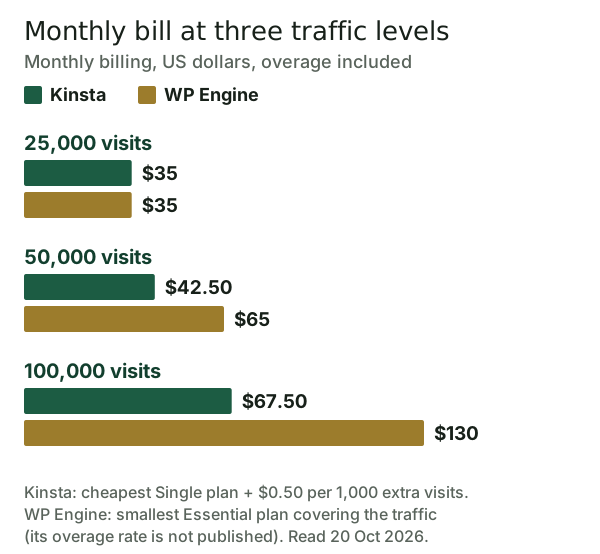
At 25,000 visits the two cost the same $35 a month. At 50,000, Kinsta's Single 35k plan plus 15,000 visits of overage comes to $42.50, which is cheaper than moving up to Single 65k at $50. WP Engine's one-site plan stops at 25,000, and because its overage rate isn't published, the only bill we can price is the three-site plan at $65.
At 100,000 visits, Kinsta's Single 65k plan plus 35,000 visits of overage costs $67.50, the same as Single 35k plus 65,000 visits of overage. WP Engine's ten-site plan, the first Essential tier that reaches 100,000, costs $130. If you genuinely run ten sites, that $130 buys more than one Kinsta site; if you run one, you pay for nine installs you don't use.
Kinsta's overage has guardrails worth knowing. Kinsta sends alerts as usage passes 80% and 100% of the allowance, plus a third at 110% for visits, and ordinary overage is simply added to the bill. An overage that reaches the plan's own price, or $500 if that is lower, counts as extreme: Kinsta can require immediate payment or an upgrade and may limit access until it is settled, and upgrading a plan doesn't cancel overage already accrued. The practical rule: when the overage approaches the price gap to the next tier, move up.
The three-year bill
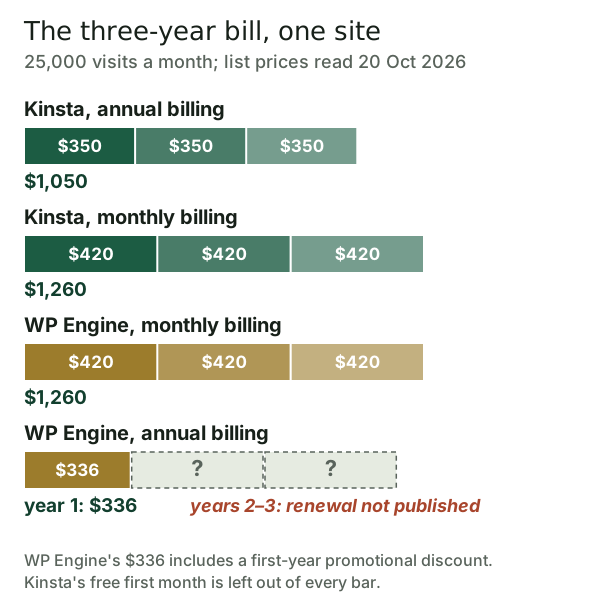
Paid annually, Kinsta's entry plan costs $1,050 over three years. Paid monthly, either host costs $1,260. WP Engine's annual option is the cheapest first year at $336, but the page states that price is promotional, and its terms say renewals run at then-current rates with notice. Nobody outside WP Engine can tell you what years two and three cost, so the honest comparison is $1,050 known against $336 plus an unknown.
Kinsta also makes the first month free on Single 35k, Single 20GB, WP 2 and Launch, on monthly or annual billing. Its 30-day money-back guarantee, which is for first-time customers only, then runs from the end of that free month. We could not confirm a refund window for WP Engine on its plans page or in its terms, so check that at checkout before you pay for a year.
Performance and infrastructure
Neither company publishes a performance figure we can check, and we have not load-tested either one, so this section sticks to what each says it includes. Kinsta lists CDN and edge caching, a managed firewall with Cloudflare Enterprise DDoS protection in front of every site, and 30 data centers. WP Engine lists its EverCache layer and a global CDN powered by Cloudflare as included from its Essential plan upward.
So at the network edge the two are closer than their marketing suggests: both put Cloudflare in front of your site. The difference that shows up on a real site is more likely to come from your theme, plugins and images than from the host. If speed is the deciding factor, test your own site on each host during the free month or refund window; our explainer on managed WordPress performance and CDNs covers what to measure.
Support, ecosystem and ownership
Kinsta advertises 24/7 human support in 8 languages and unlimited free migrations on its plans. WP Engine's Essential tier lists 24/7 chat support, while managed site migrations appear only from its Business tier upward, and Business starts at $400 a month billed annually. If you would rather hand a move to someone else than do it yourself, that difference matters more than any benchmark. Our guide to migrating to managed WordPress covers both routes.
WP Engine's ecosystem is its strongest argument. Ten premium themes and Genesis Blocks are included from the Essential plan upward, an extra site costs $20 a month against Kinsta's $30, and WP Engine also owns Flywheel. Kinsta's ecosystem is narrower but extends beyond WordPress: through its Sevalla brand it also sells application and database hosting, which suits teams running a WordPress front end next to other services.
Reliability promises differ by tier. Kinsta's SLA defaults to 99.9% uptime with credits of 5% to 20% of the monthly fee, claimed through chat within 30 days. WP Engine lists its 99.99% uptime SLA as not included on Essential and included on Business and Enterprise; Business starts at $400 a month billed annually, and Enterprise is priced through sales. Backup retention runs the other way: 14 days on Kinsta's entry plans against 30 to 60 days on WP Engine.
The WordPress.org dispute: what the 2026 ruling changed
WP Engine's lawsuit against Automattic, the company behind WordPress.com, was filed in 2024 in the Northern District of California. On 24 September 2026 the judge ruled on the motions to dismiss. Reversing her own earlier dismissal, she found WP Engine's antitrust claims viable: monopolization and attempted monopolization under the Sherman Act, plus tying claims under the Sherman Act and California's Cartwright Act. Its computer-fraud claim was dismissed without leave to amend. Most of Automattic's counterclaims survived too, but its trademark counterclaims were dismissed to the extent Automattic and Matt Mullenweg asserted them in their own right, because the court found they are neither owners nor registrants of the marks at issue. A ten-day jury trial is scheduled to start on 19 October 2027.
For a hosting customer, the ruling settles nothing final: the case continues. It doesn't change either company's plans or prices. If the dispute is part of why you are weighing a switch, note that WP Engine owns Flywheel, so moving between those two keeps you with the same company, and that Pressable's own footer calls it an Automattic hosting lab, while Automattic is the other party to the case.
Where Pressable fits
Pressable is the third option buyers in this comparison usually look at. Its entry plan, Signature 1, covers one site at 30,000 visits for $25 monthly or $250 yearly; Pressable shows no separate renewal rate and bundles Jetpack Security. The trade-off is a steeper overage, $1.20 per 1,000 extra visits against Kinsta's $0.50, so it suits sites that sit inside their tier rather than ones that regularly burst through it.
Affiliate link, marked sponsored/nofollow. We may earn a commission at no cost to you — it never changes a score or a ranking.
Who should pick which
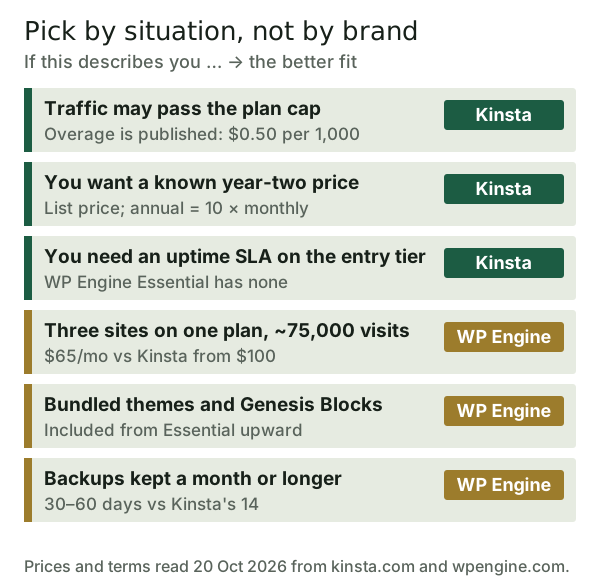
Pick Kinsta if one site carries your business and its traffic is climbing, if you want to know what year two costs before you sign, or if an uptime SLA matters at the entry price. Its published overage makes a traffic spike an arithmetic problem rather than a surprise.
Pick WP Engine if you put several small client sites on one bill, already build with Genesis, or want a month or more of backups. For three sites at 75,000 visits combined, WP Engine's $65 plan undercuts Kinsta, where WP 2 plus one extra site costs $100 and WP 5 costs $115. Agencies weighing either one at scale should also read how agencies should choose managed WordPress hosting.
Kinsta vs WP Engine: the bottom line
For one growing site, Kinsta is the more predictable bill: the same $35 entry price, a published overage, a known annual price and an SLA from the first tier. For several small sites on one plan, WP Engine is cheaper in the first year, with richer bundled tools and longer backups, but budget for a renewal it has not priced publicly. Either way, size the plan to the traffic you have now, and see where both land among the best managed WordPress hosts we rank.
Affiliate links, marked sponsored/nofollow. We may earn a commission at no cost to you — it never changes a score or a ranking.
Edge cases
- Seasonal traffic. A store that triples its visits for one month is cheaper on Kinsta's overage than on a permanent tier upgrade; on WP Engine the cost of that month can't be estimated from public prices.
- One site, then many. Kinsta adds a WordPress site for $30 a month; WP Engine for $20. Past two or three sites, compare the multi-site plans rather than adding sites one by one.
- Staging-heavy work. Kinsta sells premium staging environments at $20 a month each; check how many environments your workflow really needs before costing it.
- Bots and monitors. Both caps count traffic that never appears in your analytics, so compare plan tiers against server-side visit reports, not against Google Analytics.
If none of those apply, the decision table above settles it. The remaining risk is price drift: both companies change plan names and tiers often, so re-read the two pricing pages on the day you buy.
Kinsta vs WP Engine: quick answers
Is Kinsta better than WP Engine?
Which is cheaper, Kinsta or WP Engine?
Does WP Engine charge overage fees?
Do Kinsta and WP Engine both use Cloudflare?
Does the WP Engine lawsuit affect WP Engine hosting customers?
See how this fits the field: the best managed WordPress hosting, ranked, or read whether managed WordPress hosting is worth it.