Managed WordPress Automatic Updates (2026): Which Hosts Test Them
Most managed WordPress hosts update WordPress core for you, but automatic plugin and theme updates are usually an add-on, and only some check that your site still looks right afterwards. As of 18 Oct 2026, Kinsta charges $3 per environment a month for updates with visual regression testing, Flywheel charges $8 per site a month for managed plugin updates, and Liquid Web includes tested updates with a visual comparison on its Pro and Elite plans.
The difference matters because plugins are where updates break sites. A host that runs an update, compares screenshots of key pages and rolls back on a mismatch removes most of the risk of switching updates on. A host that only flips WordPress's own auto-update switch does not. Here is what each premium host offers, what it costs per site, and how to set it up safely.
Which managed hosts update plugins, and how
| Host | Plugin and theme updates | Visual check and rollback | Price |
|---|---|---|---|
| Kinsta | Kinsta Automatic Updates, daily or chosen days | Yes: screenshot comparison, restores backup | $3 per environment a month after a 31-day trial |
| WP Engine | Smart Plugin Manager, scheduled windows | Yes: visual regression, automatic rollback | Included on some plans, add-on on others (price not shown) |
| Liquid Web | Automatic updates on Pro and Elite plans | Yes: sandbox test with visual comparison | Included on Pro and Elite |
| Flywheel | Managed Plugin Updates, daily or weekly | Not described on the pricing page | $8 per site a month |
| Rocket.net | Toggle in its control panel; core minor updates on by default | Not described; daily backups kept 14 days | Included |
| Pressable | Customizable plugin update scheduler | Not described on the pricing page | Listed in its plan comparison |
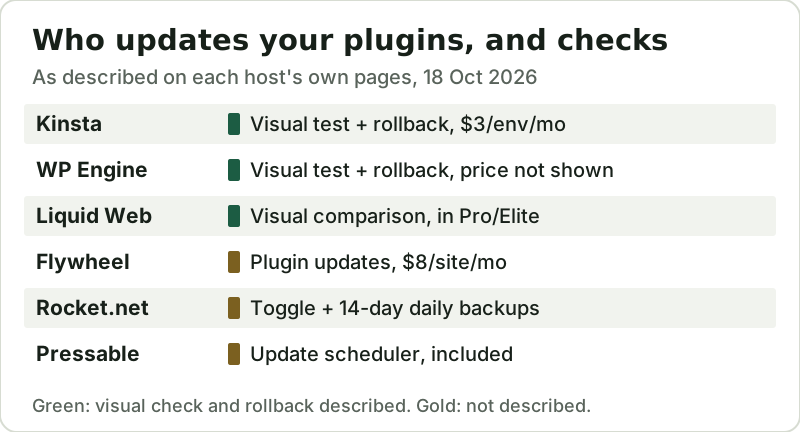
Kinsta's add-on is the most clearly documented. It updates all plugins and themes, including inactive ones, takes a backup first, captures screenshots before and after, and restores the backup automatically if the visual test flags a broken layout or a missing element. You choose daily runs or specific days and a two-hour window, and set how strict the comparison is. It costs $3 per environment per month after a 31-day free trial, and on the Single 35k and WP 2 plans it is free alongside the first free month of hosting.
WP Engine's Smart Plugin Manager does the same job with more control over which pages are checked: you can pick URLs such as the cart and checkout, test on desktop, mobile or both, and set six-hour off-peak windows and days of the week. WP Engine says it is included on some plans and a low-cost add-on on others, without printing the price on its product page; agencies reselling it are quoted from $2 per site.
Liquid Web builds the same idea into the plan rather than selling it separately. Its WooCommerce page says that on Pro and Elite plans the system tests plugin updates in a sandbox, makes a pixel-by-pixel visual comparison and holds the update back if the layout shifts, and its WordPress plan list shows automatic WordPress updates and visual comparison on every Pro and Elite tier. Liquid Web's wording limits it to Pro and Elite, so do not assume its entry Essentials tier includes it.
The remaining hosts offer scheduling rather than testing. Flywheel's Managed Plugin Updates add-on runs daily or weekly at $8 per site. Rocket.net lets you switch plugin and theme auto-updates on in its control panel and points to its daily backups, kept for 14 days, as the fallback if an update breaks something. Pressable lists a customizable plugin update scheduler in its plan comparison. None of the three describes a screenshot comparison on the pages we read, so with them, a broken layout is something you or your visitors find first.
What it costs across several sites
Per-site pricing adds up for agencies. The chart prices update tools for one, five and ten sites a month at the published rates, counting one production environment per site for Kinsta.
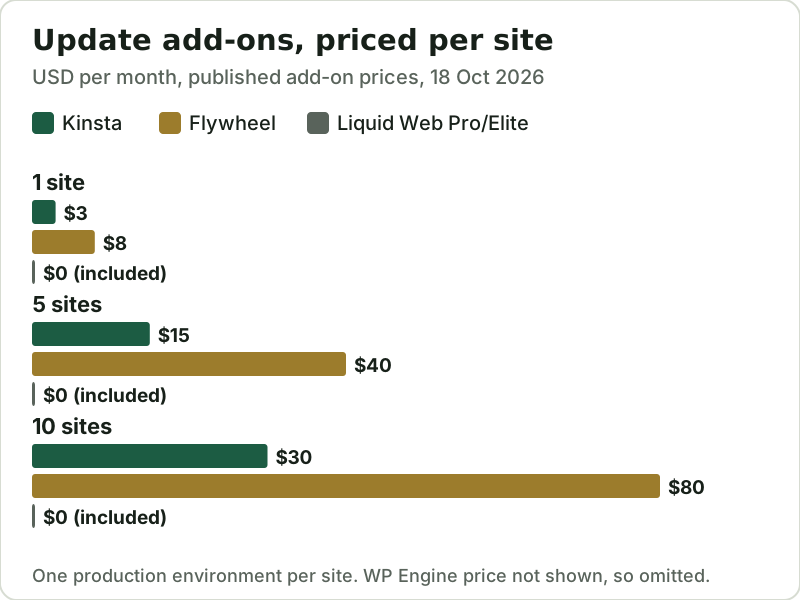
At ten sites, Flywheel's add-on costs $80 a month against Kinsta's $30, and Liquid Web's Pro and Elite plans include it. That gap can outweigh small differences in base hosting price, so include it when you compare hosts. Our managed WordPress pricing models guide covers the base plans, and the agency hosting guide covers multi-site workflows.
If you want updates with visual testing at the lowest per-site price we found, Kinsta's plans include the option to add Automatic Updates; if you would rather have it built into the plan, Liquid Web's Pro and Elite tiers include it.
WordPress's own auto-updates: free, but blind
You do not need a host's add-on to automate updates. Since WordPress 5.5, administrators can switch on automatic updates plugin by plugin and theme by theme from the Plugins and Themes screens, and WordPress emails the result of each attempt.
What the built-in option lacks is the safety net. WordPress's documentation describes the switch and the email notices, not a backup before the update, a screenshot comparison or an automatic rollback if a page breaks. If you use it, pair it with reliable backups and turn it on only for plugins with a good update record. For revenue-critical pages such as checkout, a host tool that tests those exact pages is worth the few dollars a month.
There are also plugins you should not auto-update at all. Page builders, membership and payment plugins, and anything a developer has customised can change behaviour between versions in ways a screenshot will not reveal. Exclude those from the schedule, update them by hand on a staging copy, and let the automation handle the long tail of small utility plugins that rarely change how a page looks or works.
How a safe automatic update works
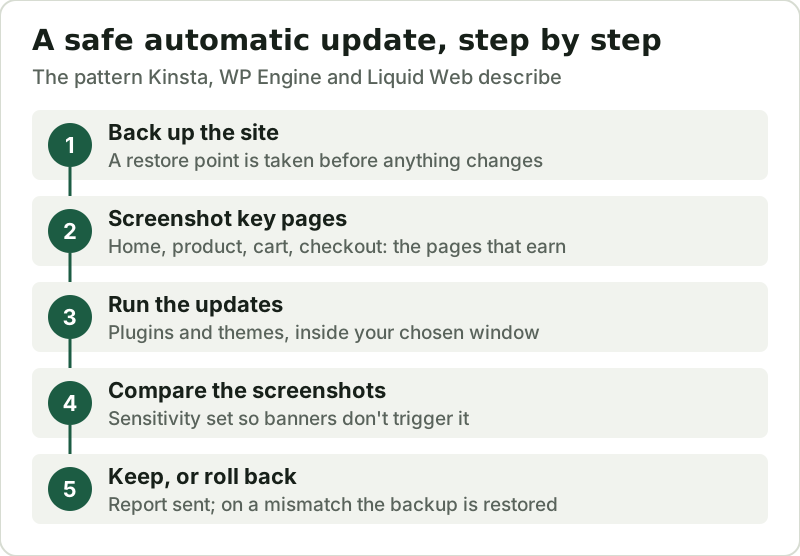
Whichever host you use, set the tool up the same way. Choose a low-traffic window, list the pages that earn money for the visual check (home, product, cart, checkout, contact form), and set the sensitivity so that a rotating banner does not trigger a rollback every night. Read the first few weekly reports, then leave it alone. Our overview of what managed WordPress hosting includes explains which other maintenance jobs a host takes on, and the managed WordPress ranking compares the hosts on price and limits.
Edge cases
- Premium plugins that check a licence key often will not update until the key is active on that site, whatever the host's tool does.
- Kinsta prices its add-on per environment, so switching it on for a paid premium staging environment as well as production would be billed twice.
- Visual tests catch layout breaks, not logic errors: a checkout that looks right but fails at payment still needs a test order after major updates.
- Rocket.net says it applies non-major WordPress core releases automatically by default; major versions are not part of that default.
- Inactive plugins still carry vulnerabilities. Kinsta's tool updates them too; elsewhere, delete what you do not use.
Managed WordPress update questions
Do managed WordPress hosts update plugins automatically?
Is it safe to turn on automatic plugin updates?
How much does WP Engine Smart Plugin Manager cost?
Does Flywheel update plugins for me?
Can WordPress update plugins automatically without my host?
See how this fits the field: the best managed WordPress hosting, ranked, or read whether managed WordPress hosting is worth it.