Kinsta Pricing Explained (2026): Plans, Overages, Add-Ons and the Real Bill
Kinsta pricing starts at $35 a month, or $350 a year, for one WordPress site with 35,000 monthly visits or 20 GB of bandwidth, and new customers get the first month free on that plan. Above that, single-site plans run to $375 a month, multi-site plans from $70 for two installs to $450 for forty, and agency plans from $340. The figure that decides your real bill is the overage: $0.50 per 1,000 visits beyond the plan, which is often cheaper than upgrading.
This page is for anyone working out what Kinsta will actually cost a specific site, including add-ons. It is not a review of Kinsta's speed; we haven't tested it. All prices are in US dollars, exclude tax, and were read from Kinsta's US pricing page on 10 October 2026 and its billing documentation on 9 October 2026.
The price list in one table
| Plan | Installs | Visits (visit billing) | Bandwidth (bandwidth billing) | Monthly | Billed annually |
|---|---|---|---|---|---|
| Single 35k / Single 20GB | 1 | 35,000 | 20 GB | $35 | $350 |
| Single 65k / Single 40GB | 1 | 65,000 | 40 GB | $50 | $500 |
| Single 125k / Single 65GB | 1 | 125,000 | 65 GB | $90 | $900 |
| Single 315k / Single 125GB | 1 | 315,000 | 125 GB | $170 | $1,700 |
| Single 500k / Single 250GB | 1 | 500,000 | 250 GB | $290 | $2,900 |
| Single 750k / Single 500GB | 1 | 750,000 | 500 GB | $375 | $3,750 |
| WP 2 | 2 | 70,000 | 40 GB | $70 | $700 |
| WP 5 | 5 | 125,000 | 65 GB | $115 | $1,150 |
| WP 10 | 10 | 315,000 | 125 GB | $225 | $2,250 |
| WP 20 | 20 | 500,000 | 250 GB | $340 | $3,400 |
| WP 40 | 40 | 750,000 | 500 GB | $450 | $4,500 |
Kinsta also lists a separate Launch line: Launch at $35 a month for one install with 15 GB of bandwidth, 15 GB of storage and an estimated 75,000 visits, then Launch Plus at $59, Build at $69 for two installs, Expand at $99 for five, Scale at $169 for ten and Lead at $299 for twenty. Above those sit Agency 20, 40 and 60 at $340, $450 and $675 a month, and Enterprise from $500 a month. On the entry Single 20GB plan, storage is 10 GB and CDN bandwidth 125 GB.
There is no introductory price anywhere on the page. Each plan's annual figure is exactly ten monthly payments, so the price you see is the price that renews, unless Kinsta changes its list prices for everyone.
Two ways to be billed: visits or bandwidth
Kinsta's single-site and multi-site plans come in two versions at the same prices. One caps monthly visits; the other caps server bandwidth. Single 35k and Single 20GB both cost $35, for instance, but one counts visitors and the other counts gigabytes.
Which is cheaper depends on your pages. A site with heavy pages and modest traffic, such as a portfolio full of large images, fills a visit cap slowly and a bandwidth cap quickly, so it suits visit billing. A site with light pages and lots of bot or API traffic does the opposite. If you're unsure, check your current host's monthly transfer and visitor figures before choosing; the managed WordPress performance and CDN explainer covers why cached files change the transfer number.
How a visit is counted
In Kinsta's billing docs, one visit means one unique IP address seen in the server logs during a 24-hour window, pooled across all sites on the plan. One person reading ten articles in a day is one visit; the same person returning the next day is a second visit. Because the count comes from server logs rather than a tracking script, it will not match what Google Analytics reports; compare plans against a server-side figure, and ask Kinsta how it treats bots if your site attracts many.
Warning emails go out when usage reaches 80% of the visit allowance, again at 100%, and once more at 110%. Usage past the cap is billed as overage; only extreme overage, covered below, can lead Kinsta to limit access.
Overage and add-on costs
Every allowance on a Kinsta plan has a published overage price. Visits cost $0.50 per 1,000 beyond the plan. Server bandwidth costs $0.50 per GB and CDN bandwidth $0.05 per GB. Disk space costs $2 per GB a month, prorated daily. Bandwidth overage is billed at the end of the month, or at the end of the first week if you're more than 250 GB over.
Two rules limit how far you can lean on overage. Once overage hits the plan's price, or $500 for plans costing more than that, Kinsta calls it extreme and may ask for payment straight away or for an upgrade, and may limit access until it is settled. And upgrading isn't retroactive: overage already accrued that month is still charged after you move to a bigger plan.
Add-ons are where a Kinsta bill grows quietly. An extra WordPress site costs $30 a month and 20 GB more disk $20. Redis object caching is $100 a month per site and a reverse proxy $50. Backups every six hours cost $20 a month per site, hourly backups $100, and external backups $2 per backup a month plus $1 per GB. Premium staging environments are $20 a month each, PHP performance $10 per 500 MB, and automatic updates $3 per environment.
When upgrading costs more than overage
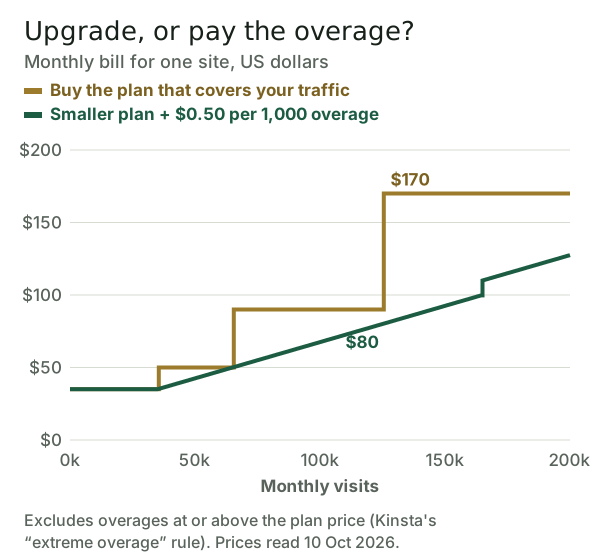
Because the overage is $0.50 per 1,000 visits, staying one tier below your traffic is often cheaper than buying the plan that covers it. Moving from Single 35k to Single 65k adds $15 for 30,000 visits, exactly the overage rate; moving from Single 65k to Single 125k adds $40 for 60,000 visits, about $0.67 per 1,000. So a site at 125,000 visits pays $80 on Single 65k with overage, against $90 on Single 125k.
The gap is widest just past a tier boundary. At 126,000 visits the covering plan is Single 315k at $170, while Single 65k plus overage costs about $80.50. The limit is the extreme-overage rule: once overage would equal the plan price, the cheaper route closes, which is why the green line jumps at about 165,000 visits. Treat this as a budgeting tool, not a dare; the alerts and the rule exist to push you up before overage gets large.
Real bills for three kinds of site
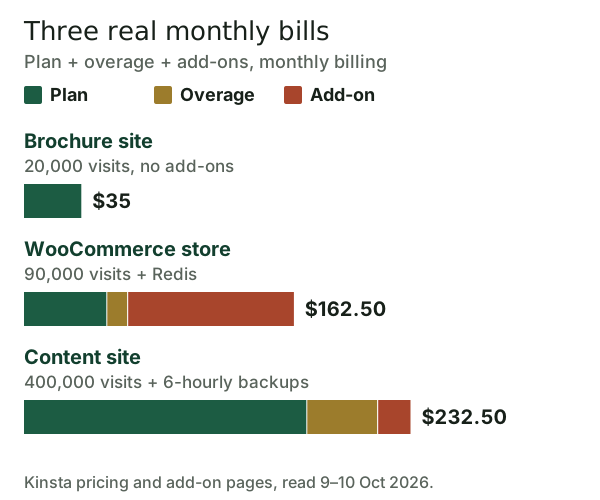
A brochure site at 20,000 visits a month needs nothing beyond Single 35k: $35 a month, or $350 a year. A WooCommerce store at 90,000 visits that wants Redis object caching pays $50 for Single 65k, $12.50 of visit overage and $100 for Redis, $162.50 a month in all. The add-on costs twice the plan.
A content site at 400,000 visits that wants backups every six hours pays $170 for Single 315k, $42.50 of overage and $20 for the backups, $232.50 a month, still cheaper than Single 500k at $290 before add-ons. These examples assume steady traffic. A store whose visits double in December should budget that month separately rather than sizing the whole year to it.
Annual vs monthly billing
Paying annually gives two months free, so Single 35k costs $350 a year instead of $420, a saving of $70. On Single 315k the saving is $340 a year. The first month free applies to Single 35k, Single 20GB, WP 2 and Launch on either billing cycle, for your first WordPress plan only, and billing starts in month two.
Kinsta's 30-day money-back guarantee covers first-time customers, runs from the end of the free month when one applies, and excludes overages, one-time fees and dedicated servers. If you're not sure the site fits a plan, start monthly, watch the visit alerts for two billing cycles, and switch to annual once the tier is settled.
Cheaper ways to get similar hosting
If Kinsta's prices are more than your site needs, three alternatives sit nearby. Pressable charges $25 monthly, or $250 yearly, for a single install with 30,000 visits and bundles Jetpack Security, though each extra 1,000 visits costs $1.20. Rocket.net charges $30 a month for one install with visits unmetered and 50 GB of bandwidth, plus $0.08 per GB beyond it, and states that it never raises prices on renewal.
Cloudways sells managed WordPress on cloud servers with no visit cap. Its pricing summary says from $11 a month, but the smallest DigitalOcean server on its US pricing page, with 1 GB of memory, lists at $14. Each has its own catch: Pressable's steeper overage, Rocket.net's bandwidth allowance, and Cloudways' server sizing, which you manage yourself. Our managed WordPress hosting ranking sets them all side by side.
Is Kinsta worth the price?
Kinsta is worth its price when a site's traffic is rising or uneven, because the $0.50 overage makes growth cheap and predictable, and when you value list prices that don't jump at renewal. It is poor value if you need several add-ons on a small plan, since Redis alone, at $100 a month, costs more than the three cheapest single-site plans, or if a few thousand visits a month is all you expect. For a small site, managed WordPress may not be worth it at all.
Affiliate link, marked sponsored/nofollow. We may earn a commission at no cost to you — it never changes a score or a ranking.
Edge cases
- Many small sites. Adding sites at $30 each overtakes a WP plan quickly: WP 5 at $115 costs less than Single 35k plus four extra sites at $155.
- Media-heavy sites. On bandwidth billing, serve images through the CDN; CDN bandwidth overage is a tenth of the server rate.
- Big imports. Disk overage is prorated daily, so a short-lived spike in storage costs only for the days it lasts.
- Tax. Prices exclude tax, so budget for VAT or sales tax where it applies to you.
Whichever case fits, re-read Kinsta's pricing page on the day you buy, because plan names and allowances have changed before and the Launch line sits beside the older Single and WP plans.
Kinsta pricing: quick answers
How much does Kinsta cost per month?
Does Kinsta have a free trial?
What happens if I go over Kinsta's visit limit?
Is Kinsta cheaper billed annually?
What add-ons does Kinsta charge extra for?
See how this fits the field: the best managed WordPress hosting, ranked, or read whether managed WordPress hosting is worth it.